23 – Universal Auto Parts – 14 Oct 2012

Go to an auto parts store and you can look down an aisle comprised entirely of air filters, or one of nothing but oil filters, not to mention hundreds of other items.  Each item within it’s category performs the same function, but for reasons of profit, the auto manufacturer changes to a new design every few years.  When I was a teenager, over 20 years ago I came up with the thought of making my own line of cars, each of which that all used as many of the same parts as possible.

Over the years I came to the understanding of the profit that was made by the parts industry, but in the end they have created hundreds of variations in parts, and made money, but shafted the consumer.  With repetition of the same part, on the other hand, you can actually improve on the original, instead of just spending engineering resources on making it a different size and shape.

My solution – universal parts.  Air filters, oil filters, and a host of other parts could easily be replaced by universal parts.  Take the air filter for example.  This has a circular or rectangular element and air is pulled through it.  The filter could be too small, but could never be too big.  The filter on a big V8 motor would never cause a problem being used with a small 4 cylinder motor.

The issue then becomes adapting a universal part to a particular application.  This could be accomplished with a simple adapter plate or piece that allows the universal part to fit into the individual car.

This concept doesn’t just hold true for air filters and oil filters.  Things like oxygen sensors in exhaust pipes,  temperature sensors, fuel filters, fuel pumps or coolant thermostats are all nearly identical in function, but are only slightly different in size and shape.  Indeed, you could easily use many parts on each and every car on the road, right down to the main computer.  You easily could adapt any wiring harness from most any production car in existence to a universal computer that would just need you know what car it was attached to, and in some cases could figure it out on its own.

This should really happen.  Then take the concept everywhere else.  Air filters aren’t just used in your car.  🙂

22 – A New Spin on Automotive Steering – Oct 13 2012

I was driving to NYC recently and considered the tire. I considered the loss of traction around a corner. Certainly due to more than one factor. You could address the problem in several ways, most of which are already being done. Moving air dams can adjust to push down on the outer edge of the car. Suspensions can also automatically adjust to keep pressure down on the tire surface. Tires can be made wider, and cars can be made with an ultra low center of gravity, both of these being obvious in a car like the Viper. That’s all great, but I think I came up with another method.

Imagine your tire is just a lot of rubber knobs. As they rotate, each row of knobs rotate down, contacts a point on the road and then rotates up. Parallels can be made to the surface of a runner’s shoe contacting the ground. Now consider your car as you go around the typical highway on-ramp or off-ramp. Your steering wheel is held in a particular direction and ( whether or not you aggressively test this out) you know that you have a limitation to how fast you can go without the car starting to slip and eventually spin out of control. This comes from the force of the turn on your vehicle. If you are turning around a right turn, the vehicle experiences G-forces to the left, and vice versa. This force could be likened to just driving straight down a section of road and having the road tilted to one side or the other. Pretty straight forward physics stuff.

Some times when I try to first get my mind around a concept I like to go the the extreme ends of the spectrum.   For instance the concept of a see saw – it’s easy to imagine the mechanical advantage of the thing if you simply imagine one that’s 50 feet long on one side and 5 feet on the other.  So in thinking of this loss of traction I went to the extreme, and considered driving as a tremendous wind storm was blowing across from one side of the road to the other, or perhaps driving on a road that was banked nearly 90 degrees to one side or the other. In either case, I imagined the car would start sliding off the road to the left or the right. What could be done? Well if you took all 4 tires and rotated them towards the wind, or to the high side of the bank you were on, and could power them all evenly, as with an all wheel drive car, you may not get our of your slide, but you would be maximizing what your tires could do about it. The downside to this of course, is that you would be going in a direction other than where you wanted to. Logically I conclude that ideally, you would just be able to drive straight in the direction you wanted, and in the worst case you would have to turn all 4 of your tires entirely 90 degrees to avoid sliding off the road, but in the process you lose all ability to go forward. Well we are never going to drive along the side of a building or through a 200 mile per hour windstorm, but logically I believe we can draw some conclusions.

My idea is simple, and I have not found any mention of the concept in even some of the advanced 4 wheel steering literature I found searching around. Simply, all 4 tires need to be turned slightly (I’m assuming around 1 to 2 degrees – probably 5 at the most) into the turn. This is not 4 wheel steering in the way it is used today, but rather just a small amount of turning.  Let’s call it “pivoting.” The rear wheels would be simply able to pivot left and right up to 5 degrees. The front wheels would be normally functioning, but have a similar pivot left and right up to 5 degrees.

My premise is that by turning all 4 tires slightly into the turn, you would be negating, to some degree, the force pushing your car off the road, while still keeping the bulk of your force going in the direction you desire to go. This pivoting / turning action would be computer controlled and could either be strictly math based or it could be accelerometer based. By that I mean that the computer could either just make the pivot adjustment by knowing that the car is traveling, let’s say, at 40 mph and the wheel is turned to X number of degrees to the left.  The computer could also just respond by pivoting the tires into the direction that an in-board accelerometer tells it to. The technology is already here to make this happen. For example, there is an accelerometer in your smartphone right now. In an iPhone 4 for instance, the accelerometer is so advanced that if you set your iPhone next to your keyboard on your desk, it can be used to accurately determine what you are typing.

I have no way to build an test this system out to prove that there are gains to be made with this method. This is, after all, some thoughts on the subject as I drive down the highway, concerning what is overall a trillion dollar industry. An industry that employs some of the most talented and well funded engineers in the world. Surely someone has thought of doing this? 🙂

21 – Concerts Done An Entirely New Way – 12 Oct 2012

Thinking of yesterday’s post (20) gives me a new spin on the concert.  What is it that you want at a concert?  Here’s my list.

I want sound quality.
I want to hear the song in a “live” way that is noticeably different than the album version.
I don’t want it to kill my ears.
I want to hear any dialogue the artist is saying.

Now, if you have ever been in a poor venue, or sat in bad seats, you know this is often a loss.  I have left concerts feeling ear fatigue and was not happy with the sound and couldn’t hear what they were saying.  Speaking of that, how often do you understand what a DJ is saying in a night club?

The fix?  Taking the app and headphones from post (20) and linking them to a direct feed optionally provided by the artist at the concert, or the nightclub.  The technology already exists for “real time” audio over wifi, but I would have to hear it to vouch for it.  That is the solution.  Now I know the gut reaction here is one of stringing me up for blaspheming on how a concert is to be properly listened to.  Sure, if you are listening at Carnegie Hall, or in good seats at the Santa Barbara Bowl or Red Rocks, then a case surely can be made for just listening.  That just isn’t the case most of the time.  The typical arena is made for maximum occupancy in observing sport contests.

If you can open your mind to trying such a thing, what do you get?  From any and every seat in the house?

You get sound quality.
You get to hear the song in a “live” way that is noticeably different than the album version.
Your ears are saved, and you can adjust how loud you would actually like it.
You will hear any dialogue the artist is saying.
You will now actually hear things you otherwise would not, and not hear unwanted things you otherwise would.  Think of small subtle details being delivered directly to your nosebleed seats.  Perhaps a funny dialogue between members of the band, or musical elements lost in the concrete and crowd noise.  Now consider the occasional feedback.  This could easily be reduced if not eliminated by the sheer fact that you are not listening to the amplified sound, rather you are direct from the main sound board.
Now let’s make a fun little twist.  Add a slider for adjusting the various concert specific elements, like crowd noise, or reverb modeled around the venue, or perhaps any venue you choose.  Nosebleed seats in the local sports arena, now with the sound of Red Rocks at center of row 5.

Truly a revolutionary idea in concert going, and one that would greatly increase satisfaction.

20 – App to Make the Justin Beiber Concert Enjoyable – Oct 11 2012

This is a departure from attempts at serious value.  A simple idea that would probably gain more traction in a viral YouTube video describing it, than in it’s actual release as an app, nevertheless, as an app it would be purchased on the sheer novelty value.

The app plays music from your music library to match the beat of music that you are hearing.  Upon installation, the app would analyze your music library and build a small database of the BPM (beats per minute) of all songs.  Later when the app is engaged, it simply listens to the music coming into the phone’s microphone and plays a song into the headphones to match the beat.  The headphones recommended would be sound blocking, of which there are various models already in existence, but from this device there would be a demand for more.  Separately, the technology for this already exists.

So, the basic premise.  You are taking your daughter to a Beiber concert, or perhaps  you are at a concert and the opening band is truly terrible.  If you were to just pop some headphones in you would certainly not enjoy whatever you were listening to.  With sound reducing headphones you can block the midrange and treble down to a bearable amount, but the bass would definitely bleed through, and make your song unlistenable.  Not to mention, even if you could completely block out the sound, you couldn’t really get into your own personal music.  God forbid you started bobbing your head or tapping your feet to a different beat than everyone else.  What a weirdo thing to do.

No need for that, just fire up the app.  In only seconds it determines the music you are being subjected to is 123 beats per minute, and quickly finds a Deadmau5 tune in your library of the same tempo.  Deadmau5 is now playing on your headphones, and it’s in complete sync with the concert.  If anything, the bass that makes it past the headphones and into your ear reinforces and adds a bit of flavor to your existing song.  Now the fun part, of course, is when your girl glances over at you to see you smiling and even bobbing your head to “her music”, and she thinks to herself, “yup Dad’s kind of cool, even he gets it!”


17-19 – Intelligent Printing Software / Paper Sensors / Built in Drivers – Oct 8-10 2012

I am dumbfounded that here in 2012 there are still some areas of mainstream technology that really just haven’t improved.  At 39 I have become a rather patient person for most any shenanigans people can throw my way. Delays and setbacks are not uncommon at the hands of strangers, and it’s truly no big deal. Where I get feisty is with the inanimate objects. Usually designed to be simple and time saving and often neither. Today I will attack something I think we all have had problems with, and how it could be fixed once and for all.  Today I will keep things as simple and straightforward as possible, as I discuss… the printer.

The problem with printers, scanners and most anything that you purchase separately and plug into your computer is accountability.  When there is a problem, the printer sprouts up a finger and points at the computer.  The computer of course, does the reverse, sprouting a finger and pointing it back at the printer.  Often times you wind up feeling like they are both giving you the finger, and that’s when you have the “Office Space” feelings of taking out a bat.  There are drivers needing to be installed.  There are settings, yes pages of settings and enhancements that can be adjusted and changed.  There is software running all the time on the computer to make sure everything comes out OK, updates that need to be run, and about the time you get everything set up the way you’d like, a window will open alerting you to a low ink cartridge.

I was frustrated with this back in the 90’s, in fact, and came up with a great idea back then to solve a lot of problems.  Feeling rather excited about this revolution, I got on the phone with a family member, who I’m not going to call out here, but let’s just say they would definitely be the person you would run a technology idea by to see if it was good.  At least that’s how I used to feel.  My idea was a single piece of software that could be used with any printer and scanner.  It would print a single sheet with a selection of colors and lines and the user would simply be told to take it from the printer and put it into the scanner. After that was scanned, the user would then be asked to take a pre-printed version of the same sheet, included with the software, and insert that into the scanner as well.  The program would then do the following.  It would analyze the print you made with your printer through your scanner and would then know exactly how to modify what you were scanning to come out as perfectly close to the original as possible.  Secondly, the program would know by scanning in the pre-printed image, what errors were present in your scanner, and be able to account for them in the settings of your scanner to give you the most realistic image. Lastly, it would analyze the pre-printed sheet and make a comparison to the sheet you printed and scanned in.  The program would now know any errors in your printer, and could account for them individually.  My premise was that most users didn’t want to tinker with settings, they just simply wanted the most accurate / true to life colors and images coming into the scanner and out of the printer.  My idea was rejected as not being viable.  O_o

OK, flash ahead about 17 years, we still don’t have a functioning model of my original idea, and now look at printers.  Mostly, we have the same issues still, and still Microsoft has not been able to build this simple comparative program into it’s ever massive operating systems.  Now at least in the printing and scanning rackets we usually have both functions in the same device.  We now have the blessed all-in-one printer/scanner, but still we are left to fend for ourselves.  The user is just told to adjust things for his or herself.  Take for instance any of the print alignment functions.  You are noticing lines are coming out wrong, so you go into the devices print manager software, and you are guided through a process of printing out an alignment sheet.  You then analyze it yourself and give feedback to the software, which then makes adjustments and aligns itself back into proper order.  My program would allow for this to be done for you.  Just print out the form and put it right into the scanner and the software does the work for you, quicker.  Now, 17 years later, I have more things we can add.

A couple of clever modifications to the printer.  With a spring and a small piece of plastic with a sensor, you could quickly and without any damage to the paper, tell the rigidity, The more rigid the paper, the more resistant it would be to a tiny bit of pressure on any one edge.  In an instant the printer would know the thickness of the paper; if it was standard thickness or card stock.  Then, with a small led and sensor you could bounce light off of a sheet and determine the glossiness of the paper, it’s color, or if it was a sheet of transparent plastic.  Use these two sensors and you wouldn’t have to be asked about what kind of paper you are using.  The printer would just know.

This last one really gets me tweaked into a fury.  Why the “engineers” in this billion dollar industry can’t figure out a proper driver delivery system, is beyond me.  When you connect your printer, it always asks for drivers.  The printer just sits there at the end of the USB cable like a shy kid at the high school dance.  Only after you load an often dysfunctional piece of software onto your computer will you then get any response from your printer.  In 2012, this is truly embarrassing.   This is why I started this blog.

Each all-in-one printer these days has built in SD card readers, for our cameras and what not.  Each printer should have an additional, small, built in SD card.  Now what do you think this SD card should have pre-loaded on it from the factory?  That’s right, printer drivers and software, for PC and Mac.  Connect the printer to the computer, and voila!  It reads the drivers and the computer can automatically begin talking with the printer, without confusing a bunch of users with CDs, downloads, and installation procedures.

It get’s better.  Update your driver?  Fine, you do that just like you did in the past, with the user downloading a newer file and executing it with the old double click.  This time though, instead of simply updating on the computer, and then having to go through the whole process again when you reload your operating system, or move the printer to a different computer, the program will update not just the computer’s driver information, but it will update the SD card that’s built into the printer.  Take the printer to Aunt Gertrude’s house and her printer will be able to pick it right up, and with the latest drivers already!

So what would you have?  You would connect the printer, and immediately be able to print.  You could fine tune the printer (in ways that you currently still can’t) in less than a minute.  The printer would not need to ask you anymore what type of paper you were using.  It would just print.  If a print ever didn’t look right to you, just run the initial fine tuning (1 minute) process and you are back on track again.  Done.  Engineers, this is the blueprint for how it needs to be done.  Please make it happen.  We are waiting.

14-16 – In Wall Computer / Wall Ventilation / Wire Access – 5-7 Oct 2012

Years ago I had a customer ask me for an estimate to do a full house, computer, multimedia solution that involved the following criteria.  Each room of the house was to have a large flat panel TV, a in wall sound system, and a media center PC that was not visible anywhere in the room, and had access to the central media server, and individual cable TV connection, and an ethernet internet connection. Each PC would have a remote control system that controlled everything in the room, a 7 inch touchscreen control panel on the wall, and a wireless mouse and keyboard.  Oh, and don’t forget, a basic His suggestion for the location of the PC cases, was centrally located in a closet somewhere in the house.  I explained to him that with DVD access in the room, and no PC visible in the room, it would require some thought.  I went home and after a couple hours had devised the in wall computer.   Please note, the ideas that make up this solution are indeed high on the techy/geeky scale.

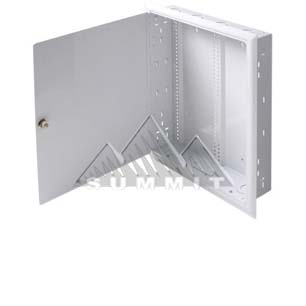
This is a in wall security case. I use it just as an example of a flush mounted case. It allows for you to go to an existing wall in most any house, cut the appropriate sized hole in between most any pair of 2x4s, and set it in place. It will set flush in the wall when installed, and can be easily opened for access as needed. My idea is relatively simple. Take the “guts” out of a small PC case (now micro ATX is common), and place them strategically in an appropriate flush mount case. With such a case, the usable depth of a standard 2×4 wall is 4″ (3 1/2″ of wood, and 1/2″ of wallboard).  Certain in wall wiring would have to be run, but with existing non-related parts combined, one could construct a fully effective PC and have it operating right in their wall. My design included a 7″ touch screen mounted on the face of the exposed panel, so that the user could have full access of the function of the PC without having to turn on the large TV, and in fact a single remote could control everything including the TV via the PC.

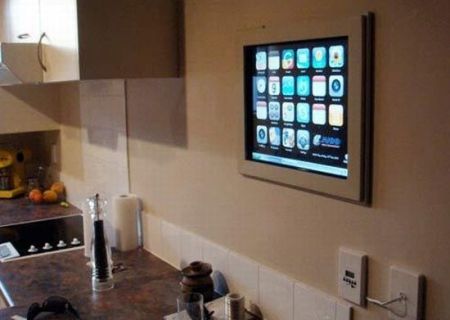
Now, just in case some folks are not getting what I’m describing, I will include this picture of a computer I found googling, that a fellow from New Zealand “put in his wall.” For more information check out his blog.
Keep in mind, all he really put in his wall was the screen.  The actual computer resides in the nearby cabinet. No knock on this guy as he does have about the coolest homemade kitchen computer you can get, but it is just a great example of the paradigm that you couldn’t fit the whole computer right into the wall.  It is amazing to me that 7 years later, computer parts much smaller, and still it appears no one has done it yet.

So going back to 2005.  I had the answer.  Put the whole computer right into the wall.  As is often my case when coming up with a solution; it begets a problem that also needs solving before the initial solution can be completely realized. The in wall computer, that night back in 2005 was exciting, but immediately a few issues came to mind. First, the CD/DVD tray. The idea of the computer case, as with any PC case, hinged around the ability to go to the local box store and buy most anything they sold and be able to use it. There was nothing existing that readily allowed for the CD/DVD tray to be accessible, when the case was installed vertically in a wall like this. Secondly, heat. There would need to be an acceptable method of circulating air through this device, or it would burn up in short order. Third, legal wiring. There are certain portions of the wiring of a appliance, like a PC, that are electrician only, and unsafe to leave exposed. There are other portions of the wiring of such an case that could be accessible safely by the homeowner or technician, and there would be certain portions of the wiring, that should be accessible for the life of the case(such as the wiring in the wall, between the PC and the TV or the PC and the Stereo unit).

The CD/DVD tray.
The solution for this is to place the slot for the tray at a 15 degree angle to the surface of the wall, so that when the CD/DVD drive faced down and slightly out towards the user, and the face resides in a recess built into the case. This way, when the tray was ejected out, it would actually extend out beyond the flat surface of the wall, and it would be slightly easier (due to the 15 degree angle) to insert a disc into the tray. There are plenty of CD/DVD drives that have small plastic tabs you can use to hold the disc in place and that allow you to mount a drive sideways, at a complete vertical. I have just never found them to be very convenient, and the angle would help.

The ventilation options within a wall.
To keep the computer case from overheating, there needs to be a certain amount of vent space for air to be taken into the case, and there needs to be a certain amount of vent space for air to be exhausted out of the case. The wall cavity is 3 1/2″ deep and would allow you several options. The first would be simply putting vents in the top and bottom surfaces of the case, and orienting the power supply (unit that has the main cooling fan for the case) in such a way to maximize flow of air through the modified case. This would be less than ideal to me, due to fan noise and the appearance of vents on the flat surface. Using the existing wall cavity already being used, the possibilities are many. It would be easy to connect the top, bottom or both sides of the case to a 3″ duct (readily available) and vent the air either up from the floor below (perhaps a basement), or vent the air up through the floor above (perhaps the attic). This option would render near silence in the room, and show no vents on the surface of the case. Another possibility would be a wall vent (like so many in homes with forced air HVAC systems) low on the wall for intake, to another wall vent high on the wall for air output. Any combination of intake or output would work. You could even take air in or push air out from the other side of the wall that your case is installed. Truly many options available, and all would involve parts available at any home improvement store.

Wiring separations.
This is further techy, and pretty much only valuable to tradesman.  Just know it’s a deal breaker if not figured out, but if done properly, as I have designed, it makes for a very cool arrangement. Simply put, when you or the computer technician swings open the panel, they will see the standard looking computer case innards and have access to everything they need. They will be able to remove and replace any component with nearly any off the shelf item. The 110v supply wiring will be encased in a standard metal box, in a portion of the case, and it will be separate from the accessible, computer case portion of the case, for the protection of all involved.  There will be a channel area that connects the cables coming into the case (inaccessible), to the cables accessible in the case.  The channel is visible by whomever opens the case, and in which resides the 110v cable with the standard appliance plug found in the back of every PC in the world. The channel would be as thin as possible and yet allow for the technician to easily unplug power to the computer in the event a power supply needed to be replaced. Yes, the case would require UL testing and certification.

That’s the idea. In 2005 it was a pretty big deal. I did meet with a patent attorney in the central New Jersey area, but there were 2 issues that kept me from pursuing a patent. First, he couldn’t assure me it would come in under a 10k budget, and second, I knew that the size of computers and the increasing reliance on notebooks would diminish the market need for such a device. I still think it would be of tremendous value in the right hands with a smart home / shared media application.  I still think it could be brought to market today in fact.  It still is the perfect solution for the demand of a proper 1080p, media center PC, with the ability to play a DVD from Netflix, and without leaving a footprint in the room.  In retrospect, I should have personally filed a provisional patent, and just shopped it around from there. Hindsight, of course, 20/20.  Now I’m onto bigger fish, but of course, as with any of my posts here, I’ll gladly assist anyone who wants to press forward and make any of these happen.

13 – Follow Me GPS! A Fun & Safe Distraction – 4 Oct 2012

By far the easiest way to travel somewhere new is when you have someone driving in front of you that you can just follow. We have GPS units, showing our car as it travels down the road, and we now have the accuracy to tell what lane we are in. We also have the ability to project images onto regions of our dashboard. Why not project the image of a car in front of us that we simply follow. Need to change a lane, and the car in front of you will signal and shift over. Need to turn and the car will actually turn slightly broadside and disappear out of view in the direction you need to turn.

For those who might think this gimmicky or silly, please reconsider. The key with a GPS is that you are guided minimally. That is to say you certainly can look down at any time and view the map if you must, or see how much time you have left in your trip if you must, but the main, essential function is that you are guided down the right path toward your destination. As such, the advantage to this visual presentation to the driver is that he or she is able to focus ahead, just like following another car, and all of the cues involved in switching lanes and turning are presented in a fun and “safely distracting” way. The image could be presented below the region of your view where the hood / front of your car ends.

I personally do a lot of driving. More than anyone I have ever met, except for professional truck drivers. My situation involves a lot of highway travel. I mute my GPS and the only issue I have is reminding myself to start paying attention to it when I get near this city or that city. Having a car in the low portion of my windshield directly above my steering wheel, suddenly put on it’s blinker and move over to the far left of my windshield, will catch my attention and will not distract me from the road. I call that a safe distraction. I would think that would be as cool as having one of my friends leading me to where I need to go.

Chess player thought. Using the motion sensing features now available in select cars, and combining that with this idea, you add a large brake light to the car image and add yet another valuable feature. Deer strike area, in the hours of dusk or dawn, and why not add hazards to the car image, and have the image of a deer stick his head up on the far right hand side of the screen when the hazards are started so you the driver know why the caution is in effect. Traction low, due to storm or road repair, just slide the image of the car back and forth a little, just to remind you of the condition, just like what you would see if your buddy was in front of you and he or she was slipping about.

12 – English as Math – 3 Oct 2012

OK, yesterday’s post has me thinking long and hard down a new road that I had not yet considered.  A great benefit to this project.  Yes, one of the main reasons for me engaging in this project is taking my brain to the gym.  So today’s thought is a further consideration of artificial intelligence, and a couple very cool outcomes that will be possible.

English as math, specifically the assignment of a mathematical value to each word in the English language.  This will be done in the process of loading the language into the computer for not just translation functions (yes after English, we will then load in all the languages of the world), but for much deeper functions, such as paraphrasing, and content creation.  It’s math in terms of absolutes, (like the word “always”) having a higher value than words with less strength (like the word “occasionally” or “usually” ).   Another measure will be a value of literary simplicity or difficulty.  Remember, I am suggesting that the computer will be loading all words, phrases, meanings and uses into a database, and making them available to aid a person in creation of content.  The “writer” may want to gear their paper for 6th grade English class, and another “writer” may be  intending to create a PhD level essay.  The computer could rate all words on their ability to be understood by young readers, or perhaps their ability to impress high level intellectuals.

Now add another step to the equation.  Take the same level of intelligent analysis of the language and have the software go out and catalog every sentence of every scholarly sentence in existence, and then every news article, and even every opinion piece and blog post.  These items could all be rated as well.  Studies could be rated high on one scale while opinion could be rated high on another.  Now, take the intuitive auto complete of a standard Google search and connect it to this in depth database of all information, and you have a new world.

Many things should just out at you right away, ways that you could use such a database, but here’s a few that come to mind tonight.  First, Siri would become much MUCH smarter.  Second, let’s say you wanted to write an essay for college.  No more wasted hours looking up information and using citations and crediting others just to back up an opinion.  Now you just make an opinion statement verbally to the computer.  The software comes back and reports, “I have 48 sources on that topic, and they are 82% agreeable to your position. You then simply state the required word count, amount of sources, and any particular points you want to make, and the software goes out and gathers the data, paraphrases all pertinent data, organizes the content and writes an entire essay, to include citations and reference list.This leaves you, the student, thinking and learning, instead of reading, and searching.  Lawyers could in seconds find precedent on topics not by searching keywords, but for searching for topics and particulars and the software could find actual relevant information without being hung up by keywords that may not match exactly.  Individuals could look up medical issues and immediately find ALL related study data, and it would be simplified ACCURATELY down to whatever level of understanding is needed.  Politicians could be fact checked as the words came out of their mouth, by a computer.

Now, this is where the conversion would be very critical.  Conversions would have to be exacting.  Opinion would be wildly dangerous to the overall math if represented as fact, and vice versa, and yes, now take a computer that can accurately create content based on basic concepts and combine that with proper translation software and similarly setup databases of language in other tongues, don’t forget a brilliant text to speech technology, and you can pick up the phone anytime and have a game of worldwide phone roulette.  How much fun would that be?

10-11 Real Computer Generated Voice / Voice Stealing? 1-2 Oct 2012

OK, so at this point everyone should be familiar with the computer voice.  The siri voice for example, is functional, but still has no life.  What is the problem, and how do they fix it?  Well to put it as simple as possible, the technology, at least on an individual device is still based on word by word pronunciation.  Call siri attractive and she will say “there, there.”  It sounds like 2 completely separate words, instead of a full phrase.  Similar with the droid version.  It knows to lower the pitch of the second word because it is at the end of the segment, but it is just not treating the phrase / combination of words like we would.  We naturally assign pitch and timing to various words in a group, so that we wind up emphasizing particular words to have a particular effect.  For instance, everyone will read that last sentence and naturally put a slight delay after the comma, but also after the word “timing” and also after the second instance of the word “words.”  There are also, more subtle delays taking place in other portions of the sentence.  I will write it out in a way to illustrate this timing break.

We naturally assign pitch and timing

to various words

in a group,

so that we wind up emphasizing

particular words

to have a particular effect.

I think to put it as simple as possible the program needs to be reading ahead, and making grammatical determinations.  This shouldn’t be too big an issue, since Word has been doing this for us for a while. What I’m describing would be a “next step” in the analysis of the text on the part of the computer.  The grammar drives the pitch and timing of the phrase, and it doesn’t need to be a comma or period to have a noticeable amount of delay.  I have read others claiming that there would have to be more data involved during the writing process in order to put emphasis where it should be, and I say nonsense.  We are able to figure out where it goes.  The AI should too.

There is a second issue with current text to voice technology. Currently, when I set up a customer with their own messaging software that includes a text to voice solution, they are required to read a lengthy script of words, for the computer to sample and piece together a basic vocabulary of sounds.

To put this simply, the computer is taking particular words and sounds and piecing other words from those samples.  The technology exists already for voice to text.  Yet it is not being utilized in this, it’s most needed application.  The software should be simply sampling from any length of speech and determining the words it is hearing, then (as mentioned above) analyzing the grammar cues from the sentence structure, then comparing the actual pitches and delays with the grammar determinations made, and assigning a character to the voice it is hearing.  Combining this with the actual tone of the voice, and the way in which certain letter and letter combinations sound, a realistic synthesis occurs.  The data pulled from the sample, is put against a saved template.

I will use the analogy of a Barbie type doll.  Currently sounds are chopped and combined like parts of a doll glued together.  I’m talking about a new doll being formed complete, after simply observing another doll. Any samples used, like hair color, height, facial features, etc, are simply compared to what the software has already saved as a standard template for what a doll should look like, and the samples are not having to be gathered by taking snapshots of the doll in certain, particular poses, in particular angles.  The software would just need a few shots, and then would be making the calculations and going immediately into synthesis mode.  Obviously, the more footage you got, the more accurate the facsimile to the original.

The real fun, and inevitable conclusion of this system being utilized, is simply recording a particular voice, (perhaps Morgan Freeman from the movie War of the Worlds), with your smart phone.  Then letting your app synthesize that voice, and it sounding perfect.  Everyone would be available.  Easily have whatever voice you want for your GPS or voicemail message by just listening to that person for a short while.  Taking any book pdf file you have and having Morgan Freeman read it to you, without having to pay Morgan Freeman to sit in a room and actually read through the whole thing.

Issues- Obviously if a paragraph was full of improper writing and poor sentence structure, the grammar determinations may be ugly, but that would be that way in text form already, so that isn’t the fault of the software, that’s the fault of the writer.

IDEA – whew, this is a first for me so allow me to revel in a small delight.  A wonderful idea comes to me whilst writing about another.  This is immense.  Since the software will be making grammar determinations and reading the sentences back to you, the following scenario would be possible, and is absolutely revolutionary.

The user, in this case a high school student, is preparing an essay.  He simply reads into the PC or phone and the device takes dictation and prepares the essay.  When he is finished he asks the device for a quick review.  Making comparisons to it’s existing standardized database of proper english stylings, as mentioned above, the device comes across a particular sentence and says,

” the prepositional phrase, “under the bridge” in sentence 15, would flow better if placed before the word “because.”   May I demonstrate? ”

The device could then read the sentence back with the improvement, or could be set up to automatically correct for improved flow.  Why not, while your at it, look up the professor online and after determining his or her home town, modify my story to contain certain references to landmarks in the town of their youth.

8-9 Automated Tile Mosaic Manufacturing / Interface – 29-30 Sept 2012

Wow, some honest assessment….
Today, I asked myself, “am I really going to be able to generate over 350 ideas in a year that are worth reading?”  I don’t think the issue is having the ability to continue, rather I think the issue is going to be those days rich with family time, where my mind is just operating differently.  My 16 year old son is aware of my project and I have shared some posts with him.  While he seems to be enthusiastic about it, (ha, as enthusiastic as a teenage lad could be about something that didn’t giggle and wear makeup), I can not allow my balance to be lost as I pursue this project.  I will do my best, and try to keep pride and delight in that knowledge.  Alright, back to it.

I was fooling about on Photoshop and came across an effect that could, in a mere click, take any picture and turn it into a tile mosaic.  Having years of tile experience, and a few dandy mosaics to my name, I immediately thought of an option for the lot of us, who don’t have a team of mosaic artists like the Vatican, and would like some custom art.  A website that would allow folks to submit pictures, decide sizes and detail levels, and order custom, “photo real”, tile mosaics that would actually be custom, made to order and the entire process would be automated.

Ok, to start with the website.  It would allow customers to upload and edit images.  Crop, color, and other Instagram type effects would all be available.  They could then pick a size and detail amount, with an automatically adjusting price.  They could see a virtual image of what the finished mosaic would look like and then submit payment and set the wheels into motion.

At the heart of the manufacturing would be various tile varieties, in various colors, and various sizes.  A computer guided robotic arm with a very small suction tip would be oriented over a 13″ by 13″ grid.  The available tiles would be oriented in an array that would allow for easy loading into bins and the tiles would be run down individual chutes to the array so that they could be easily grabbed with the suction tip, hovered over a precise portion of the grid, and dropped in an exact location.  The mechanical engineer who assisted me with the design assures me the equipment he has worked with would be able to grab and place 100 pieces in such a speed that it would look like time lapse video.

The grid would then be “tightened up” using an adjustment of the four sides and a certain amount of vibration, causing the tiles to come close together.  The system would be set up to produce whatever total size the customer wanted, in 12″x12″ sheets, typical of what you purchase at the tile yard. Next would come a gluing and the placement of a backing sheet, which allows the tile setter to easily set the mosaic in place and keep everything aligned.  The glue and backing sheet would be placed directly on top of the tiles as they are setting in the grid, so yes, the computer would have already had the design placed upside down and backwards.  The finished sheet would then be set on a drying rack.  Done.

Without the use of a computer, a custom mosaic shop can not touch a photo with any sense of realism or expectation that you will recognize a persons face, but with the computer, an adequate amount of colors and the right amount of detail this would now be possible, and with a human only required to handle oversight.  The money that folks would pay to have a proper landscape scene or portrait accurately represented in marble or glass tile, is ridiculously high. Truly, priceless.  It just can’t be done previous to a device such as I am describing.  The beautiful part is that with such a device, it would be affordable to those who don’t necessarily own their own jet.

I hope to see this happen.  Please note, I am not for a second talking about printed mosaics.  This is not a legit mosaic.  They are in every other Subway sandwich shop.  I am talking about real mosaics, using real materials.  Just for example (and because I’m not going to hijack anyone’s personal photos) just google “Vatican mosaic studio” and look at some human made stuff that truly is beyond price, taking hundreds of hours to make.