58 – Coordinated Smartphone 3D Capture

Taking the concepts of the last 2 days, I will take a step back.  Take all existing smartphone technology and create simply an app that does 5 things. 

1. It uses wifi and/or bluetooth to set up an exacting timing sych between 2 or more “connected” phones. 
2. It uses the accelerometer of each device to get a near exact reference to where each phone’s camera is “looking.”
3. It coordinates the 2 or more phones to take a collective group picture.
4. As a combined session, each smartphone uploads the images to a centralized server, where sofware creates a realistic 3D image.
5. The centralized server then shares this 3D image with all participating phones.

(A techy note – how I envision step 2 happening is once all phones are synched up, the software would direct the participants to place all 2+ phones on top of each other, oriented the same way, with particular phones in a particular place in the “stack.”  This way, when phones were then picked up and moved into position for the “shot,” the accelerometers all be used to provide their various approximate location data.  This is suprisingly accurate in todays phones – and the central server’s software would be able to fine tune the image from this initial data sampling)

This is beyond a cool idea.  A pretty limitless bit of technology.

I’m in for $1000 to making this a reality.

57 – 3D Imaging with your phone

From yesterday’s post, I will just consider the possibilities of having 4 HD cameras at the 4 corners of the back of your smartphone.  The first thing I can think of with this configuration is the ability to capture and quantify small objects in 3D.  Simply hold the phone within a certain distance of a small object and sampling from all 4 cameras, the phone would easily be able to determine the 3D layout of whatever the object was.  Using existing technolog combined in this way, such a device could easily find accurate sizes and quantities of whatever it was capturing.

Imagine the combination of such a “scanning” function with a 3D printing device, and you could literally capture the 3D image of a trinket on the street in Korea, and in moments be printing out an exact replica for you back home in New York.   The fact that it can indeed be incorporated into smartphones makes it a wild technological advancement when you consider the potential database of everyone’s captures.

Oh geez, my brain has me on a roll of thought, as tomorrow’s idea should demonstrate.  Let’s take it a step further!

56 – A Truly See Through Phone

OK, there are some ideas born from a need of great importance, which yield some substantial human improvement.  There are others which are just cool, and need to be done, just to be done.  Today’s idea comes after I observed some of the “cutting edge” apps available for smartphones these days.  Apps that give a virtual 3D view at the phone, spawned the idea in my head that it would be very cool if the view of the phone included more than just the option for transluscent windows, and icons over a background image.  What I would like to see, at least as an option, would be a translucent view of those same windows and icons over what is actually behind the phone.  That’s right, you put your hand behind the phone, and you can clearly see your fingers, as well as whatever is behind the phone.  Then another option that immediately comes to mind is the “hands free” mode of view, where you would only see the background, and you would not see anything immediately behind the phone, like the users hand.

To accomplish this, you would need more than just a single camera.  You would need a grid of cameras, and some intelligent software to combine the images into one single image.  I realize that this would be considered wasteful.  There are, of course, other purposes that this “camera grid” could be used for, but staying on the point of today’s post, I will just acknowledge this feature wouldn’t be for everyone.  Just off the top of my head, I would suggest that 4 HD cameras would be at each of the 4 corners of the phone, and 10 or so lower quality cameras would be organized in a grid between them.  The 4 HD cameras would be the basis for the view, and the bulk of the background image would be derived from them.  The advantage of having 4 would be that if you were in the “hands free” mode and did not want to see your hands in the image you would be less likely to block the view with your hand.  The software would know from sampling all 4 of the images that there was a hand blocking one or more of the cameras and it would grab the view from the corner or corners you were not blocking.

Now, in the more realistic “hands included” mode, the display of your actual fingers would be included as part of that background image.  This would be done with coordination of the 4 HD cameras, with the grid of “lesser” cameras.  The software would first use the 4 HD cameras to create an acurate image of what was behind the phone.  Then, all cameras would be sampled to determine exactly what, if anything, was blocking that view.  If you slide a finger directly behind the phone, the cameras will focus on it and using comparative software, be able to create an exact image of what that finger looked like, if the phone and LCD were actually a piece of glass that you were able to look through.

An additional neat function of this grid and software combination, would be the ability to set your phone down nearly right flat directly onto a printed page of paper.   As you sat the phone onto the paper, the image would be gained.  If you were to slide the phone onto another image, the act of that sliding would allow for the camera grid to effectively sample the page, and gain an accurate image, even if certain parts of the page weren’t able to be sampled at any given period of time.   Tiny built in LEDs would be used to light the close up image enough for functional capture.  These LEDs would not need to be bright at all.   Indeed, you could set your phone onto a desk in complete darkness, and if your screen was on, you would see with perfect clarity, perhaps the business card, it was resting on.

Again, not a societal necessity, but a really cool visual on your phone.  For that, you need to see tomorrow’s post on what REALLY mind blowing stuff this technology would allow.

53 – A Refined Filter Is The Inevitable Result Of Startup Weekend – Nov 12 2012

So a friend of mine convinced me to attend a Startup Weekend – http://www.startupweekend.org . I don’t like talking in this forum but siffice to say, in the minutes before the event actually kicked off, I had met a fellow participant and while we were reading over the program documentation, I said to my new friend, “why wait for the weekend? There are people in every city coming up with solutions for issues. There are developers living all over the country. There are investors looking to be part of the next cool product. Why are we limiting the process to location. This entire process could be automated on the web and the connection wouldn’t depend on location.

The first thing that came to mind was the inevitable cherry picking of ideas that would occur if all the ideas from a startup weekend were to be posted online for people to scan through. No bueno. So the solution goes like this. Users would register for access, establish an account, a login, pay a fee and enter a specific, moderated discussion room. Within this room would be only the participants during a particular time frame or session. The ideas could be submitted via uploaded 1 minute video (which would reduce the dilemma of stage fright that hits some folks when they get a microphone handed to them and they are standing in front of 150 people). One at a time, the videos could be privately streamed to each participants screen, with buttons on the player making it easy to highlight, dismiss, or favorite certain ones. After the viewing, there could be a deliberation period and then a vote would be electronically gathered from all participants.

The top 10% of the ideas could be announced in an automated product, with contact information and team forming could begin from the group involved.

Here’s a huge value part of this model. During startup weekend, you do not have the exact team you want. You may need more developers, or a business developer, or a designer. There may only be one or two business developers in the building, and they are already on another team. With an online solution, you could build in a connection to a “freelance.com” type of site, where developers were standing by, for a fee or rate, and you could have an affordable solution on the team in a matter of a couple hours.

Now, you have a predetermined amount of time to get your presentations put together, again, the end result is a 5 or 10 minute video presentation.

A couple of problems with Startup Weekend, is that you have 5 minutes to pitch an unknown panel, who may not have any idea what you are pitching about, and in my case, you may not be able to conceivably even get them to comprehend the concept. It is a fact that the better decision will be made, the more informed the panel is. Specifically, if you had a 10 minute video, a website, a business plan, and some manner of a video representation of product demonstration, it would be more valuable than just a 5 minute presentation with a 3 minute Q&A.

Some other advantages to this model. You would be able to have focused events. Medical, academic, entertainment, and other folcused get togethers would bring a better, more porductive group of ideas and likewise you would have a better, more aware panel to be selling the finished product to.

I won’t argue that it is really cool to do white board brainstorming in person with your team, and it’s very cool to just disconnect from the normal grind and get lost in the process, in person. That being said, the advantages of a global monthly get together being available to those who were interested far outweight what geography would limit the average participant.

I may pitch this at a Startup Weekend. 🙂

51 – Using 3D To Create New Images – Nov 10 2012

Starting with yesterday’s post, I’d like to take a look at something waiting for us, right around the development corner.   Simply put, taking any number of images on any one thing, for instance several pictures of our president here in the United States, and loading them into the app/software and gaining 3D perspective and function.  The sole purpose, in this particular case, would be to be able to create new 2D images.

You take 2 or more pictures of the president, being from different perspectives, and load them into the software.  The software creates a 3D dataset for the image.  Then you pick your angle, click “render” and you get a brand new image of the president, that satisfies the following criteria –

1. It is from a brand new vantage, not necessarily supplied by the source images.
2. It is as detailed as the original source images, and would be humanly impossible to determine “created.”

This may hit your mind as a rather simple thing, but it has far reaching application.  Consider anytime you saw a well photoshopped image of perhaps a famous actor in some awkward situation, and you couldn’t tell it wasn’t a real photo.  This would be a lot easier to get away with if you could simply create any 2d angle of that particular persons face you wanted.  On a more troubling front, think of the value of photo evidence in criminal investigation, if images can simply be created out of thin air.

50 – One Click Image Copyright Removal – Nov 9 2012

So there will be advancements I bring up that some will not be a fan of. Take any picture on the web. In it’s existing form it is to some varrying degree copy protected. If you take the image and modify it by any digital method, it will retain either it’s original details( perhaps you run it through a color filter) or it will leave some digital evidence of it’s original self (perhaps you blur the image to some degree). To “lose” the copyright, you have to “lose” the image. This won’t always be the case. Our minds take the group of details that we see in front of us at all times and are constantly trying to make associations. Take a persons face for instance. To our minds it is a collection of shapes that our minds are easily able to recognize as a particular person, or that of a stranger. Similarly, when we look at an artistic rendering of a particllar person, we usually can see the similarities and as long as the artwork is at all decent, we immediately know who the artist is emulating. An extreme example of this is political cartoon work. Certain important details are greatly exaggerated, and yet you immediately know who the character is, being portrayed. So now look at all those images out on the web. The technology currently exists that would allow for a algorithm based process to be run against any image that would first determine what type of image it is, who or what is in the image, the orignial source of the image and it’s copyright status, and then simply remove that copyright by altering the image in any number of ways that retain the complete recognition of the original image, yet are completely unlinkable to that original work. Adobe has many methods of applying filters to images, yielding differing results, but as mentioned above, the process can easily be traced backwards, or it modifies the image to such a degree, that it can’t be recognized. How? Well a book could be written of all the possibilities. Perhaps the software recognizes that the picutre is a portrait. Most cameras can easily already recognize the faces in a picture. The greater determination can be made about the image, the better and quicker the software can make a change that accomplishes the desired result. As I see it there are 2 factors that give an image characteristics that are traceable. First, overlay. If you traced any image by hand onto a tranceparency, you would have a very distinct organization of points on both the original and the traced image that would tie the two together. Second, is individual pixel characteristics. For instance if you had two images of a forest, and you zoomed into one corner of the image and noticed the details of one particular tree branch were exactly the same, you would know you had a copy. So if you wanted to change an image to remove evidence of it’s origin, you would have to address both of these factors. The easiest way to handle the “overlay” problem is the randomization of the overall image, specifically small details like the proportions of the various features of the face. Subtle changes to the proportion would yield a face that would still be recognized. I have experimented with this on a small scale, on the computer and by hand, doing portrait drawings. The brain accepts a wild amount of subtle changes to the overall picture before it starts to register the image as “distorted.” To handle the second issue, the detail recognition, you would simply randomize the pixels individually, or as a group. This could be done currently, as easily as any Adobe graphics filter, but in future incarnations, as our software recognizes more details and is able to categorize them, (such as looking at an image of a tree and recognizing branches and leaves), the inevitable result will be the computer being able to do things like take in a picture of a forest and recreate it by perhaps replacing al the pine trees with weeping willows, or instantly turning a portrait picture of a white man into a black man, and doing it accurately. The ramifications of such things are quite far reaching, and I will cover more specifically in a future post. This is far simpler than most would think, and a one click solution would be pretty snazzy for folks who are just trying to have a particular visual and they don’t want to get snagged using some random web photo that perhaps isn’t marked as copyrighted and turns out to be. True, there are people out there making a living selling photos online, and I am not in the business of diminishing other’s work or value. I’m just in the business of looking ahead, to a world where they, like the musician, need to structure their price and availability at a reasonable level. One that encourages sales and not piracy. Another way to say it is having people buy your product because they want to and not because they have to.

47 – Tunegrow – Nov 6 2012

The combination of a simple game environment (like Farmville), with the reality that is the music industry.  What you wind up with is the biggest thing to hit the music business since Itunes.

This was officially brought forward at Startup Weekend Binghamton, and there are now 6 founders and a large team moving this one forward.  More information to follow.  Check facebook.com/funegrow for information as it gets released.

17-19 – Intelligent Printing Software / Paper Sensors / Built in Drivers – Oct 8-10 2012

I am dumbfounded that here in 2012 there are still some areas of mainstream technology that really just haven’t improved.  At 39 I have become a rather patient person for most any shenanigans people can throw my way. Delays and setbacks are not uncommon at the hands of strangers, and it’s truly no big deal. Where I get feisty is with the inanimate objects. Usually designed to be simple and time saving and often neither. Today I will attack something I think we all have had problems with, and how it could be fixed once and for all.  Today I will keep things as simple and straightforward as possible, as I discuss… the printer.

The problem with printers, scanners and most anything that you purchase separately and plug into your computer is accountability.  When there is a problem, the printer sprouts up a finger and points at the computer.  The computer of course, does the reverse, sprouting a finger and pointing it back at the printer.  Often times you wind up feeling like they are both giving you the finger, and that’s when you have the “Office Space” feelings of taking out a bat.  There are drivers needing to be installed.  There are settings, yes pages of settings and enhancements that can be adjusted and changed.  There is software running all the time on the computer to make sure everything comes out OK, updates that need to be run, and about the time you get everything set up the way you’d like, a window will open alerting you to a low ink cartridge.

I was frustrated with this back in the 90’s, in fact, and came up with a great idea back then to solve a lot of problems.  Feeling rather excited about this revolution, I got on the phone with a family member, who I’m not going to call out here, but let’s just say they would definitely be the person you would run a technology idea by to see if it was good.  At least that’s how I used to feel.  My idea was a single piece of software that could be used with any printer and scanner.  It would print a single sheet with a selection of colors and lines and the user would simply be told to take it from the printer and put it into the scanner. After that was scanned, the user would then be asked to take a pre-printed version of the same sheet, included with the software, and insert that into the scanner as well.  The program would then do the following.  It would analyze the print you made with your printer through your scanner and would then know exactly how to modify what you were scanning to come out as perfectly close to the original as possible.  Secondly, the program would know by scanning in the pre-printed image, what errors were present in your scanner, and be able to account for them in the settings of your scanner to give you the most realistic image. Lastly, it would analyze the pre-printed sheet and make a comparison to the sheet you printed and scanned in.  The program would now know any errors in your printer, and could account for them individually.  My premise was that most users didn’t want to tinker with settings, they just simply wanted the most accurate / true to life colors and images coming into the scanner and out of the printer.  My idea was rejected as not being viable.  O_o

OK, flash ahead about 17 years, we still don’t have a functioning model of my original idea, and now look at printers.  Mostly, we have the same issues still, and still Microsoft has not been able to build this simple comparative program into it’s ever massive operating systems.  Now at least in the printing and scanning rackets we usually have both functions in the same device.  We now have the blessed all-in-one printer/scanner, but still we are left to fend for ourselves.  The user is just told to adjust things for his or herself.  Take for instance any of the print alignment functions.  You are noticing lines are coming out wrong, so you go into the devices print manager software, and you are guided through a process of printing out an alignment sheet.  You then analyze it yourself and give feedback to the software, which then makes adjustments and aligns itself back into proper order.  My program would allow for this to be done for you.  Just print out the form and put it right into the scanner and the software does the work for you, quicker.  Now, 17 years later, I have more things we can add.

A couple of clever modifications to the printer.  With a spring and a small piece of plastic with a sensor, you could quickly and without any damage to the paper, tell the rigidity, The more rigid the paper, the more resistant it would be to a tiny bit of pressure on any one edge.  In an instant the printer would know the thickness of the paper; if it was standard thickness or card stock.  Then, with a small led and sensor you could bounce light off of a sheet and determine the glossiness of the paper, it’s color, or if it was a sheet of transparent plastic.  Use these two sensors and you wouldn’t have to be asked about what kind of paper you are using.  The printer would just know.

This last one really gets me tweaked into a fury.  Why the “engineers” in this billion dollar industry can’t figure out a proper driver delivery system, is beyond me.  When you connect your printer, it always asks for drivers.  The printer just sits there at the end of the USB cable like a shy kid at the high school dance.  Only after you load an often dysfunctional piece of software onto your computer will you then get any response from your printer.  In 2012, this is truly embarrassing.   This is why I started this blog.

Each all-in-one printer these days has built in SD card readers, for our cameras and what not.  Each printer should have an additional, small, built in SD card.  Now what do you think this SD card should have pre-loaded on it from the factory?  That’s right, printer drivers and software, for PC and Mac.  Connect the printer to the computer, and voila!  It reads the drivers and the computer can automatically begin talking with the printer, without confusing a bunch of users with CDs, downloads, and installation procedures.

It get’s better.  Update your driver?  Fine, you do that just like you did in the past, with the user downloading a newer file and executing it with the old double click.  This time though, instead of simply updating on the computer, and then having to go through the whole process again when you reload your operating system, or move the printer to a different computer, the program will update not just the computer’s driver information, but it will update the SD card that’s built into the printer.  Take the printer to Aunt Gertrude’s house and her printer will be able to pick it right up, and with the latest drivers already!

So what would you have?  You would connect the printer, and immediately be able to print.  You could fine tune the printer (in ways that you currently still can’t) in less than a minute.  The printer would not need to ask you anymore what type of paper you were using.  It would just print.  If a print ever didn’t look right to you, just run the initial fine tuning (1 minute) process and you are back on track again.  Done.  Engineers, this is the blueprint for how it needs to be done.  Please make it happen.  We are waiting.

14-16 – In Wall Computer / Wall Ventilation / Wire Access – 5-7 Oct 2012

Years ago I had a customer ask me for an estimate to do a full house, computer, multimedia solution that involved the following criteria.  Each room of the house was to have a large flat panel TV, a in wall sound system, and a media center PC that was not visible anywhere in the room, and had access to the central media server, and individual cable TV connection, and an ethernet internet connection. Each PC would have a remote control system that controlled everything in the room, a 7 inch touchscreen control panel on the wall, and a wireless mouse and keyboard.  Oh, and don’t forget, a basic His suggestion for the location of the PC cases, was centrally located in a closet somewhere in the house.  I explained to him that with DVD access in the room, and no PC visible in the room, it would require some thought.  I went home and after a couple hours had devised the in wall computer.   Please note, the ideas that make up this solution are indeed high on the techy/geeky scale.

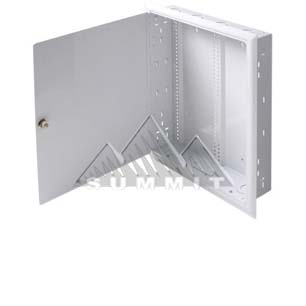
This is a in wall security case. I use it just as an example of a flush mounted case. It allows for you to go to an existing wall in most any house, cut the appropriate sized hole in between most any pair of 2x4s, and set it in place. It will set flush in the wall when installed, and can be easily opened for access as needed. My idea is relatively simple. Take the “guts” out of a small PC case (now micro ATX is common), and place them strategically in an appropriate flush mount case. With such a case, the usable depth of a standard 2×4 wall is 4″ (3 1/2″ of wood, and 1/2″ of wallboard).  Certain in wall wiring would have to be run, but with existing non-related parts combined, one could construct a fully effective PC and have it operating right in their wall. My design included a 7″ touch screen mounted on the face of the exposed panel, so that the user could have full access of the function of the PC without having to turn on the large TV, and in fact a single remote could control everything including the TV via the PC.

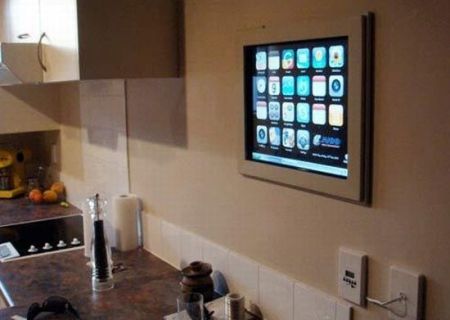
Now, just in case some folks are not getting what I’m describing, I will include this picture of a computer I found googling, that a fellow from New Zealand “put in his wall.” For more information check out his blog.
Keep in mind, all he really put in his wall was the screen.  The actual computer resides in the nearby cabinet. No knock on this guy as he does have about the coolest homemade kitchen computer you can get, but it is just a great example of the paradigm that you couldn’t fit the whole computer right into the wall.  It is amazing to me that 7 years later, computer parts much smaller, and still it appears no one has done it yet.

So going back to 2005.  I had the answer.  Put the whole computer right into the wall.  As is often my case when coming up with a solution; it begets a problem that also needs solving before the initial solution can be completely realized. The in wall computer, that night back in 2005 was exciting, but immediately a few issues came to mind. First, the CD/DVD tray. The idea of the computer case, as with any PC case, hinged around the ability to go to the local box store and buy most anything they sold and be able to use it. There was nothing existing that readily allowed for the CD/DVD tray to be accessible, when the case was installed vertically in a wall like this. Secondly, heat. There would need to be an acceptable method of circulating air through this device, or it would burn up in short order. Third, legal wiring. There are certain portions of the wiring of a appliance, like a PC, that are electrician only, and unsafe to leave exposed. There are other portions of the wiring of such an case that could be accessible safely by the homeowner or technician, and there would be certain portions of the wiring, that should be accessible for the life of the case(such as the wiring in the wall, between the PC and the TV or the PC and the Stereo unit).

The CD/DVD tray.
The solution for this is to place the slot for the tray at a 15 degree angle to the surface of the wall, so that when the CD/DVD drive faced down and slightly out towards the user, and the face resides in a recess built into the case. This way, when the tray was ejected out, it would actually extend out beyond the flat surface of the wall, and it would be slightly easier (due to the 15 degree angle) to insert a disc into the tray. There are plenty of CD/DVD drives that have small plastic tabs you can use to hold the disc in place and that allow you to mount a drive sideways, at a complete vertical. I have just never found them to be very convenient, and the angle would help.

The ventilation options within a wall.
To keep the computer case from overheating, there needs to be a certain amount of vent space for air to be taken into the case, and there needs to be a certain amount of vent space for air to be exhausted out of the case. The wall cavity is 3 1/2″ deep and would allow you several options. The first would be simply putting vents in the top and bottom surfaces of the case, and orienting the power supply (unit that has the main cooling fan for the case) in such a way to maximize flow of air through the modified case. This would be less than ideal to me, due to fan noise and the appearance of vents on the flat surface. Using the existing wall cavity already being used, the possibilities are many. It would be easy to connect the top, bottom or both sides of the case to a 3″ duct (readily available) and vent the air either up from the floor below (perhaps a basement), or vent the air up through the floor above (perhaps the attic). This option would render near silence in the room, and show no vents on the surface of the case. Another possibility would be a wall vent (like so many in homes with forced air HVAC systems) low on the wall for intake, to another wall vent high on the wall for air output. Any combination of intake or output would work. You could even take air in or push air out from the other side of the wall that your case is installed. Truly many options available, and all would involve parts available at any home improvement store.

Wiring separations.
This is further techy, and pretty much only valuable to tradesman.  Just know it’s a deal breaker if not figured out, but if done properly, as I have designed, it makes for a very cool arrangement. Simply put, when you or the computer technician swings open the panel, they will see the standard looking computer case innards and have access to everything they need. They will be able to remove and replace any component with nearly any off the shelf item. The 110v supply wiring will be encased in a standard metal box, in a portion of the case, and it will be separate from the accessible, computer case portion of the case, for the protection of all involved.  There will be a channel area that connects the cables coming into the case (inaccessible), to the cables accessible in the case.  The channel is visible by whomever opens the case, and in which resides the 110v cable with the standard appliance plug found in the back of every PC in the world. The channel would be as thin as possible and yet allow for the technician to easily unplug power to the computer in the event a power supply needed to be replaced. Yes, the case would require UL testing and certification.

That’s the idea. In 2005 it was a pretty big deal. I did meet with a patent attorney in the central New Jersey area, but there were 2 issues that kept me from pursuing a patent. First, he couldn’t assure me it would come in under a 10k budget, and second, I knew that the size of computers and the increasing reliance on notebooks would diminish the market need for such a device. I still think it would be of tremendous value in the right hands with a smart home / shared media application.  I still think it could be brought to market today in fact.  It still is the perfect solution for the demand of a proper 1080p, media center PC, with the ability to play a DVD from Netflix, and without leaving a footprint in the room.  In retrospect, I should have personally filed a provisional patent, and just shopped it around from there. Hindsight, of course, 20/20.  Now I’m onto bigger fish, but of course, as with any of my posts here, I’ll gladly assist anyone who wants to press forward and make any of these happen.