
Years ago I had a customer ask me for an estimate to do a full house, computer, multimedia solution that involved the following criteria. Each room of the house was to have a large flat panel TV, a in wall sound system, and a media center PC that was not visible anywhere in the room, and had access to the central media server, and individual cable TV connection, and an ethernet internet connection. Each PC would have a remote control system that controlled everything in the room, a 7 inch touchscreen control panel on the wall, and a wireless mouse and keyboard. Oh, and don’t forget, a basic His suggestion for the location of the PC cases, was centrally located in a closet somewhere in the house. I explained to him that with DVD access in the room, and no PC visible in the room, it would require some thought. I went home and after a couple hours had devised the in wall computer. Please note, the ideas that make up this solution are indeed high on the techy/geeky scale.
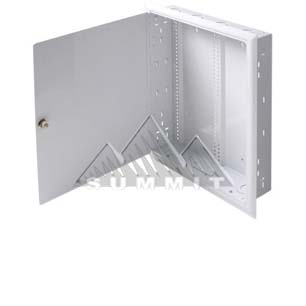
This is a in wall security case. I use it just as an example of a flush mounted case. It allows for you to go to an existing wall in most any house, cut the appropriate sized hole in between most any pair of 2x4s, and set it in place. It will set flush in the wall when installed, and can be easily opened for access as needed. My idea is relatively simple. Take the “guts” out of a small PC case (now micro ATX is common), and place them strategically in an appropriate flush mount case. With such a case, the usable depth of a standard 2×4 wall is 4″ (3 1/2″ of wood, and 1/2″ of wallboard). Certain in wall wiring would have to be run, but with existing non-related parts combined, one could construct a fully effective PC and have it operating right in their wall. My design included a 7″ touch screen mounted on the face of the exposed panel, so that the user could have full access of the function of the PC without having to turn on the large TV, and in fact a single remote could control everything including the TV via the PC.
Now, just in case some folks are not getting what I’m describing, I will include this picture of a computer I found googling, that a fellow from New Zealand “put in his wall.” For more information check out his blog.
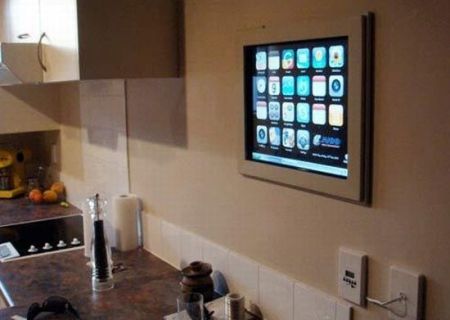
Keep in mind, all he really put in his wall was the screen. The actual computer resides in the nearby cabinet. No knock on this guy as he does have about the coolest homemade kitchen computer you can get, but it is just a great example of the paradigm that you couldn’t fit the whole computer right into the wall. It is amazing to me that 7 years later, computer parts much smaller, and still it appears no one has done it yet.
So going back to 2005. I had the answer. Put the whole computer right into the wall. As is often my case when coming up with a solution; it begets a problem that also needs solving before the initial solution can be completely realized. The in wall computer, that night back in 2005 was exciting, but immediately a few issues came to mind. First, the CD/DVD tray. The idea of the computer case, as with any PC case, hinged around the ability to go to the local box store and buy most anything they sold and be able to use it. There was nothing existing that readily allowed for the CD/DVD tray to be accessible, when the case was installed vertically in a wall like this. Secondly, heat. There would need to be an acceptable method of circulating air through this device, or it would burn up in short order. Third, legal wiring. There are certain portions of the wiring of a appliance, like a PC, that are electrician only, and unsafe to leave exposed. There are other portions of the wiring of such an case that could be accessible safely by the homeowner or technician, and there would be certain portions of the wiring, that should be accessible for the life of the case(such as the wiring in the wall, between the PC and the TV or the PC and the Stereo unit).
The CD/DVD tray.
The solution for this is to place the slot for the tray at a 15 degree angle to the surface of the wall, so that when the CD/DVD drive faced down and slightly out towards the user, and the face resides in a recess built into the case. This way, when the tray was ejected out, it would actually extend out beyond the flat surface of the wall, and it would be slightly easier (due to the 15 degree angle) to insert a disc into the tray. There are plenty of CD/DVD drives that have small plastic tabs you can use to hold the disc in place and that allow you to mount a drive sideways, at a complete vertical. I have just never found them to be very convenient, and the angle would help.
The ventilation options within a wall.
To keep the computer case from overheating, there needs to be a certain amount of vent space for air to be taken into the case, and there needs to be a certain amount of vent space for air to be exhausted out of the case. The wall cavity is 3 1/2″ deep and would allow you several options. The first would be simply putting vents in the top and bottom surfaces of the case, and orienting the power supply (unit that has the main cooling fan for the case) in such a way to maximize flow of air through the modified case. This would be less than ideal to me, due to fan noise and the appearance of vents on the flat surface. Using the existing wall cavity already being used, the possibilities are many. It would be easy to connect the top, bottom or both sides of the case to a 3″ duct (readily available) and vent the air either up from the floor below (perhaps a basement), or vent the air up through the floor above (perhaps the attic). This option would render near silence in the room, and show no vents on the surface of the case. Another possibility would be a wall vent (like so many in homes with forced air HVAC systems) low on the wall for intake, to another wall vent high on the wall for air output. Any combination of intake or output would work. You could even take air in or push air out from the other side of the wall that your case is installed. Truly many options available, and all would involve parts available at any home improvement store.
Wiring separations.
This is further techy, and pretty much only valuable to tradesman. Just know it’s a deal breaker if not figured out, but if done properly, as I have designed, it makes for a very cool arrangement. Simply put, when you or the computer technician swings open the panel, they will see the standard looking computer case innards and have access to everything they need. They will be able to remove and replace any component with nearly any off the shelf item. The 110v supply wiring will be encased in a standard metal box, in a portion of the case, and it will be separate from the accessible, computer case portion of the case, for the protection of all involved. There will be a channel area that connects the cables coming into the case (inaccessible), to the cables accessible in the case. The channel is visible by whomever opens the case, and in which resides the 110v cable with the standard appliance plug found in the back of every PC in the world. The channel would be as thin as possible and yet allow for the technician to easily unplug power to the computer in the event a power supply needed to be replaced. Yes, the case would require UL testing and certification.
That’s the idea. In 2005 it was a pretty big deal. I did meet with a patent attorney in the central New Jersey area, but there were 2 issues that kept me from pursuing a patent. First, he couldn’t assure me it would come in under a 10k budget, and second, I knew that the size of computers and the increasing reliance on notebooks would diminish the market need for such a device. I still think it would be of tremendous value in the right hands with a smart home / shared media application. I still think it could be brought to market today in fact. It still is the perfect solution for the demand of a proper 1080p, media center PC, with the ability to play a DVD from Netflix, and without leaving a footprint in the room. In retrospect, I should have personally filed a provisional patent, and just shopped it around from there. Hindsight, of course, 20/20. Now I’m onto bigger fish, but of course, as with any of my posts here, I’ll gladly assist anyone who wants to press forward and make any of these happen.
 100 Good Ideas