
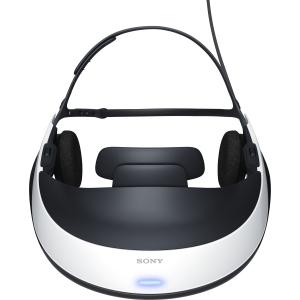
These glasses are the Sony HMZT1 and provide not just sound, but a virtual 72″ 3d screen.
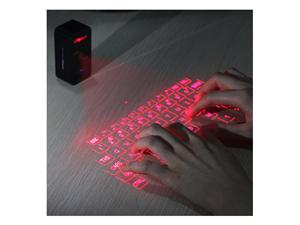
This is the virtual keyboard, using lasers to create a virtual keyboard, and trace the movements of the hand, taking in keystroke data. I actually did have a brief email exchange, some years back with one of the Siemens’ engineers in Germany, who was working on the initial concept development. (that was concerning just some of the finer points on the virtual keyboard, specifically the initial calibration and setup)
The really cool stuff occurs when you look at the two of these combined, with the addition of position tracking. The concept occurred to me a few years ago. With the virtual keyboard you are limited to “press” the virtual keys within the confines of the laser representation of the keyboard. Linking up the two devices would allow you to have a completely adjustable keyboard surface, colored anyway you want. Now I will describe what I’m talking about.
The user places the keyboard on the desk surface. With added positional tracking of the device, the computer is able to track the actual location of the keyboard surface. Now the user puts on the glasses, and with the positional tracking of the glasses, the computer is then also able to track the actual location of the users viewpoint.
Now imagine a simple black background screen. Using the positional tracking, you swivel your head 360 degrees, and everywhere you look is black. Turn on the virtual keyboard, and now when you look down in the vicinity of the keyboard, a virtual representation of it appears. You position your hands, (also represented on the screen because they are being picked up by the laser sensors built into the virtual keyboard), and the keyboard now can adjust to you. Perhaps you just hold down your pointer fingers wherever you’d like and the computer knows this is the designated “calibration” command. The virtual keyboard grows or shrinks and aligns itself to your fingers, and now you can just start typing. When you look up, the computer can show you whatever you’d like. If you need to look down again to orient yourself, you will see the virtual keyboard, existing in the field of view exactly where it is in reality.
If I get a chance I will put up some sketches of this, as I know it is a concept that some will not completely grasp either what it means visually, or what it means functionally. I assure you, it’s mind blowing stuff. 🙂
 100 Good Ideas